📑
The investor report
A ready-made monthly P&L in the format you show an investor or partner: actuals vs last month, xlsx or PDF, for the whole company or a single venue.
1
Request the report in the bot
Use
Available only to the owner and admin — the same as
/investor_report. With no arguments it covers last month. You can pass the month, the venue, or both, in any order: /investor_report 06.2026, /investor_report Downtown, /investor_report Downtown 06.2026.Available only to the owner and admin — the same as
/profit and /export.🤖
Horeca Assistant
/investor_report
⏳ Building the investor report for 07.2026…
📑 Investor report 07.2026, UAH
Period: 2026-07-01 — 2026-07-31
MONTHLY TURNOVER: 1,129,345 (Δ +20,966)
TOTAL COST OF GOODS: 419,029 (Δ +14,216)
GROSS PROFIT: 710,316 (Δ +6,750)
EXPENSES: 380,658 (Δ −13,539)
NET PROFIT / LOSS: 329,658 (Δ +20,288)
CASH BALANCE (2026-08-01): 121,657
Period: 2026-07-01 — 2026-07-31
MONTHLY TURNOVER: 1,129,345 (Δ +20,966)
TOTAL COST OF GOODS: 419,029 (Δ +14,216)
GROSS PROFIT: 710,316 (Δ +6,750)
EXPENSES: 380,658 (Δ −13,539)
NET PROFIT / LOSS: 329,658 (Δ +20,288)
CASH BALANCE (2026-08-01): 121,657
📥 Download xlsx📄 PDF
2
What the report shows
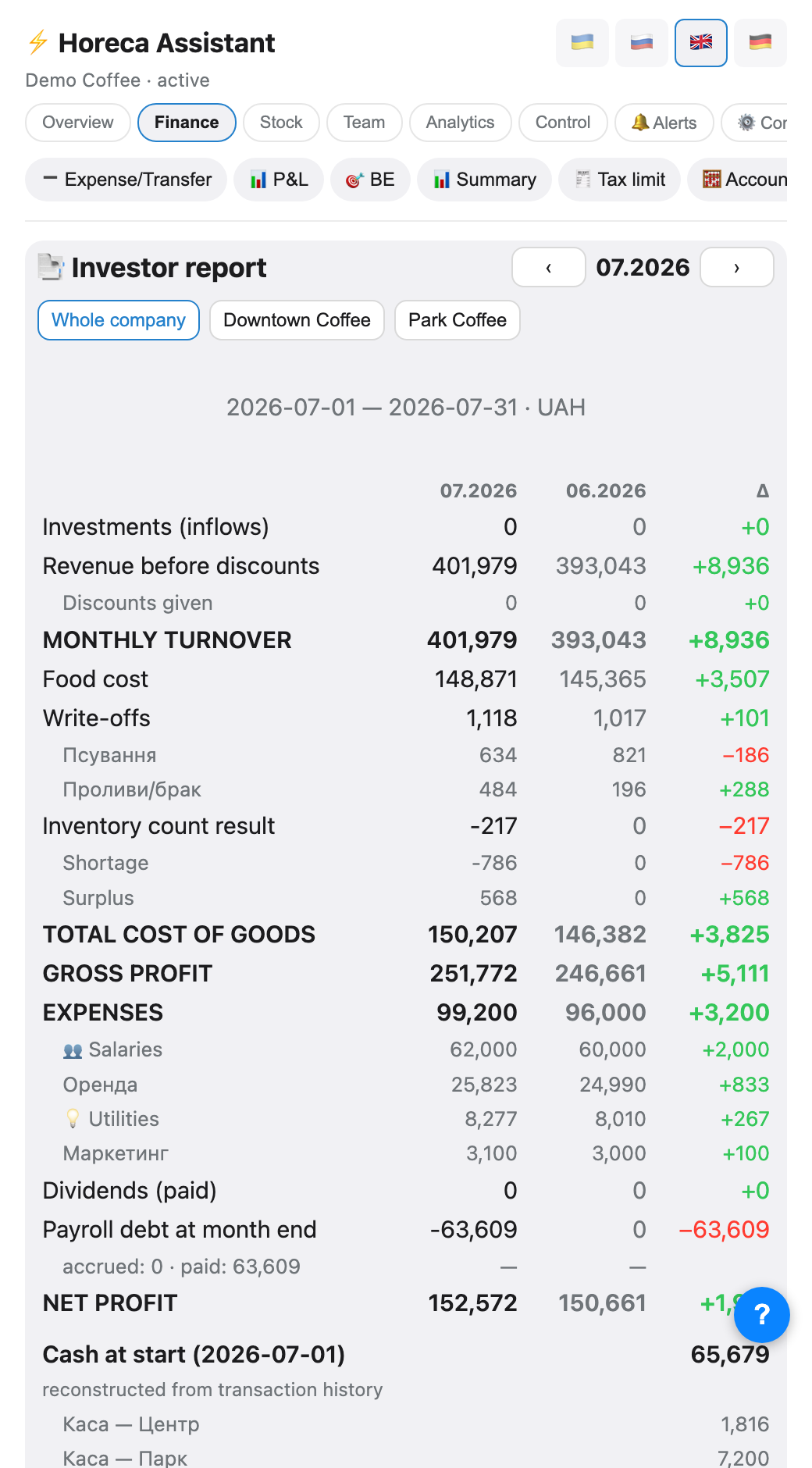
One sheet per month, three columns side by side: this month's actuals, last month's, and the difference. Inside is a full P&L: turnover before discounts, cost of goods, write-offs by reason (from Poster: expiry, taken, damaged…), inventory shortage and surplus shown separately, expenses by Poster category, and payroll debt.
Investments and dividends come from Poster finance operations — matched by category name or a word in the comment («investment», «dividend»).
Investments and dividends come from Poster finance operations — matched by category name or a word in the comment («investment», «dividend»).
💡 To keep the «Investments» and «Dividends» rows from staying at zero, record those operations in Poster with a matching category or a keyword in the comment.
3
Payables and payroll debt
The bot calculates payroll debt itself: what was accrued for shifts minus what was paid out, accumulated from the first month with recorded shifts. A negative number means an overpayment (last month's debt was settled).
The bot cannot see accounts payable or rent arrears in Poster — those two rows stay blank in the report; fill them in by hand before sending it out.
The bot cannot see accounts payable or rent arrears in Poster — those two rows stay blank in the report; fill them in by hand before sending it out.
⚠️ Payouts to people you excluded from the roster («ignored» in /staff — owner, accountant) never enter the payroll debt: their pay is not calculated from shifts.
4
Whole company or one venue
Below the report are venue buttons. Tapping one rebuilds everything: receipts, stock, expenses and payroll debt are calculated for that single venue only (via the Poster accounts linked to it). The «🏢 Whole company» button returns to the combined view.
5
In the app
The same view lives in the Finance → 📑 Investor report tab (owner only). Arrows switch the month, the chips at the top pick the company or a single venue, and the two buttons at the bottom download xlsx or PDF.
FAQ
Why is "Cash at the start of the month" empty for old months?
Poster does not store account balances "as of a past date" directly — the bot reconstructs them from operation history, so the number is not instantly available for every possible period. Stock cost for very old months cannot be reconstructed at all — that block shows a "no data" note.
Why is the payroll debt negative?
That is not a mistake — more was paid out than accrued for the month itself (for example, settling last month's remainder). Check the row's comment for the breakdown: «accrued X · paid Y».
Can the accountant request this report?
No, currently only the owner and admin — the report includes dividends and the full financial picture. If the accountant needs it regularly, ask the owner to forward the finished file, or grant them the admin role.